FROM OUR EXAMPLE FILM
The identities need to carry into the memory.
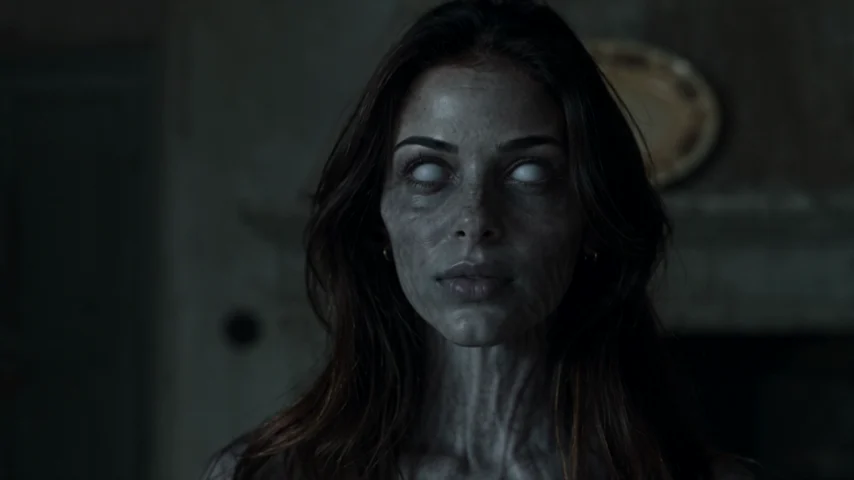 THE ENCOUNTER
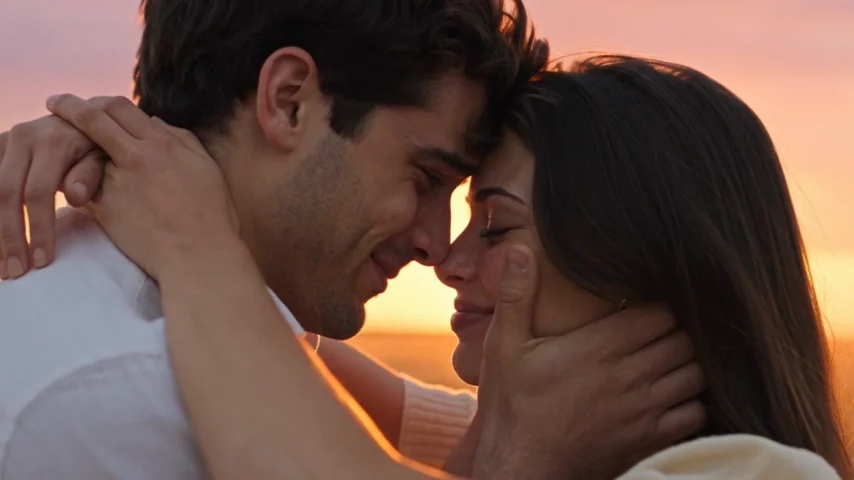 THE MEMORY
Compare the infected close-up with the healthy face in the memory. Changes in lighting and styling should leave a recognizable person. These are generated-film frames, not the portraits you need to upload. From the AI Zombie example film. Your faces, motion and timing can differ.
Pick the clearest identity, not the most dramatic photo
Compare the actual face before choosing a favorite picture. A well-lit, ordinary portrait may be a better reference than a dramatic selfie with one eye hidden in shadow. Look for visible eyes, a readable hairline and facial features that have not been heavily smoothed.
Use a recent photo that resembles how the person wants to appear. The generator may invent clothing and movement, so the reference does not need a full-body action pose. Do not add zombie makeup or an embrace pose just to imitate the ending.
| Photo choice | Prefer | Reconsider |
|---|---|---|
| Subjects | One adult with a clearly identifiable face | A group with several competing faces |
| Light | Even light with both eyes readable | Deep shadows, glare or strong backlight |
| Obstructions | Eyes, cheeks and mouth visible | Sunglasses, masks or hair across the face |
| Editing | Natural texture and recognizable features | Heavy beauty filters or altered facial proportions |
| Framing | Enough space for the whole face and hair | A tiny face or a crop cutting off the head |
Crop carefully when the source includes other people
A separate portrait is the simplest starting point. If your only source is a couple or group photo, make a separate crop for each adult in your own image editor. Remove other faces while leaving the selected person's whole face, hair and enough surrounding detail to recognize them.
Inspect the crop at its actual size. Enlarging a tiny face does not create missing detail, and aggressive sharpening can add halos rather than useful features. If the eyes and mouth remain unclear, ask the person for another photo instead.
Do not crop through the forehead or chin just to remove a neighbor. If one person's arm, hair or face overlaps the selected subject, choose a different source when possible. The aim is an unambiguous identity, not identical framing at any cost.
The two portraits can come from different moments
You do not need matching backgrounds, clothing or camera angles. The portraits guide two identities, while the prepared story supplies the setting and action. Choose each person's clearest image independently.
Similar face size and lighting can make your own role check easier, but do not distort a picture to force a match. Keep both people recognizable and let the generator compose the scene.
Before uploading, confirm permission from both adults for an AI-generated affectionate story and for any planned sharing. A photo being available online does not mean the person has agreed to that use.
Check the files and role labels before generating
Use JPG, PNG or WebP, up to 8 MB per image. If a phone photo is in another format, export a copy in a supported format and check that the face still looks clear. Keep the original file separately.
Upload the person who turns into the slot labeled “The one who turns.” Upload the human partner into “The one who stays.” Do not assume the order from another website or prompt: tools can assign the first photo differently.
Review the two previews and permission choice before confirming generation. Selecting a portrait does not mean you are ready to spend a credit. If you swap the roles, check the labels and confirm permission again as the interface asks.
Add your portraits to the love story generatorUse the original portraits to review the result
After generation, compare each face with its reference in both the encounter and the memory. Look at the eyes, nose, hair and overall face shape. A good opening frame does not prove that the identity stays stable throughout the clip.
AI can change facial details, clothing and motion even with clear references. These photo choices reduce ambiguity; they do not guarantee exact likeness. If you see a serious identity issue, keep the task ID and contact support rather than assuming a sharper export will repair it.
Source photos are removed from active storage within 24 hours of a task ending. Finished videos remain available for 30 days unless deleted sooner. Download the result you want to keep, and see the privacy policy for the full retention details.
Read how uploaded photos and finished videos are handledBefore you upload your portraits
Should both portraits face exactly the same direction?
No. Clear, front-facing or gently angled portraits are a practical starting point. Avoid extreme profiles or large obstructions, and keep each face recognizable.
Can I use a screenshot of a photograph?
A supported image file may work, but prefer the original photo when available. Screenshots can add interface elements, compression and a smaller face. Crop away unrelated content and inspect the result.
Can I upload a photo of a child or a pet?
No. This generator supports two adult people. Both must be at least 18 and authorize the use of their images.
Do better zombie love story photos guarantee the same face in every frame?
No. Better references make identities less ambiguous, but AI can still alter the face or movement. Review the entire generated video before sharing.