Choose a tool
AI Zombie Video Generators Compared: Which Fits Your Story?
In this article
The right AI zombie video generator depends on the video you want: a two-person reunion, a single face turning undead, or a scene you can direct and edit. Those are different jobs, even when the product pages use similar names.
For someone who wants a two-person reunion without writing prompts or editing clips, our recommendation is AI Zombie. It keeps the setup focused on your two portraits and delivers a short film with sound through a one-time video pack. Seadanse and ZombieTrend offer other preset choices; Kadenly, Kapwing, and Glima suit different creative needs.
This guide is written by the AI Zombie team. It combines current product information with observations from selected sample videos. We did not generate the same photos across every tool; the recommendations describe suitable uses and visible story choices rather than a universal quality ranking.
Choose an AI zombie video generator by the job
| Tool | Useful when you want… | Starting material | Workflow focus |
|---|---|---|---|
| AI Zombie | A preset reunion with two adults | Two portraits | Named roles, included sound, and one-time video packs |
| Seadanse | A longer preset story or a pet version | Two photos | Format and memory choices |
| ZombieTrend | A scene preview before paying for motion | Two photos | Preview first, then choose a video length |
| Kadenly | To revise the scene direction | Two portraits and an editable prompt | Editable setting, ending, and camera direction |
| Kapwing | To create and edit zombie content in a studio | Text or reference images | Character creation and project editing |
| Glima | A single portrait transformed into a zombie | One image | Portrait animation and transformation styles |
We selected these six because they describe distinct zombie-specific workflows. A general video generator may also create zombie scenes, but listing every model would make it harder to answer the practical question: which workflow gets you closest to the story you want?
The comparison uses the same questions throughout: What do you supply? What can you control? What output is described? What payment information can you check? What example supports the product's presentation?
AI Zombie: a complete two-photo story
AI Zombie turns two portraits into a 15-second reunion story with sound, exported as MP4 in vertical 9:16 or landscape 16:9. You assign the zombie and human roles, confirm both adults' permission, and generate using a video credit. An account is required.
Its strongest fit is someone who already likes the reunion format and wants to supply the people rather than direct the scene. You do not need to write a prompt or assemble separate clips. The trade-off is creative control: this is not a tool for specifying an original screenplay, individual shots, or exact dialogue.
The appeal is how little you have to organize before starting. The two upload slots name the roles, a swap control lets you reverse them, and the format choice covers both tall and wide video. Sound comes with the finished clip. For a couple trying this idea for the first time, that is a practical combination: choose the faces and roles without first learning prompt writing, scene assembly, and audio editing.
The account also gives you somewhere to return. Once a generation has started, it continues in the background; My videos keeps the task status and the completed download together. You can close the page instead of keeping a browser window open while you wait. Finished videos remain available for 30 days unless deleted sooner, giving you time to save your MP4.
One video costs $9.90. Three cost $24.90; five cost $39.90. These are one-time packs. A new version consumes another credit, while watching or downloading an existing video does not. A confirmed failed generation returns a credit; dissatisfaction with a completed creative result is a separate issue.
That pricing makes AI Zombie an appealing option for an occasional project: you can buy one story without taking on a recurring subscription. If you already plan to make several, the five-video pack brings the listed price to $7.98 per video. The larger pack is optional; the single-video purchase remains available.
AI Zombie's 15-second sample. Follow the timestamps below to compare the snarl, lunge, and transition into the warm memory.
Exact likeness is not guaranteed. Watch for identity continuity and movement rather than assuming your portraits will match every frame of the example. If this is the format you want, open the two-photo generator.
Why we recommend AI Zombie for a compact, dramatic reunion
What we value most in our sample is the way movement carries the story through the change of setting. A restrained opening gives way to a facial snarl and then a full-body lunge. The warm memory continues that movement into an embrace, connecting the tension and affection through one clear action.
These are the moments to compare in this particular clip:
| Approximate time | Visible detail | Why we value it |
|---|---|---|
| 1.5–4.5 seconds | An upright, held pose followed by a close view of clouded eyes and mottled skin | The infected character is established before the emotional decision |
| 5–6.5 seconds | The survivor lowers the weapon and opens his arms | The change from resistance to acceptance is easy to read |
| 7–8 seconds | The expression tightens and the mouth opens to expose the teeth | The threat becomes more immediate before the approach |
| 8–9 seconds | A side view shows the forward lunge; the warm scene continues into a catch | The transition connects the two worlds through the characters' movement |
| 9–15 seconds | The embrace settles into a close, affectionate exchange | The ending has time to resolve the tension |
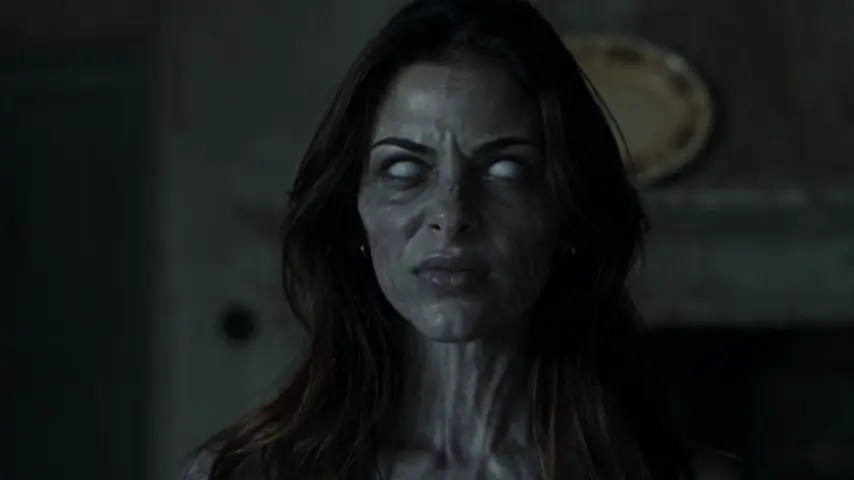
Around 7.6 seconds: the facial expression changes before the full-body action.
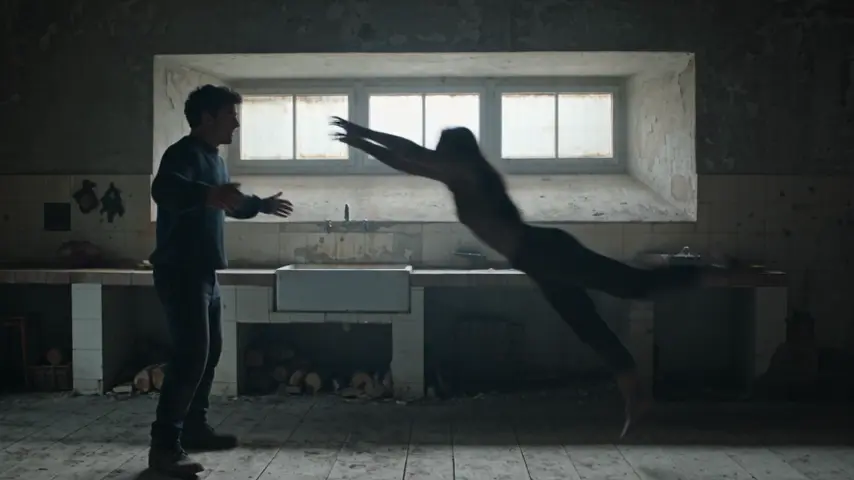
Around 8.6 seconds: the wide side view makes the forward movement visible.
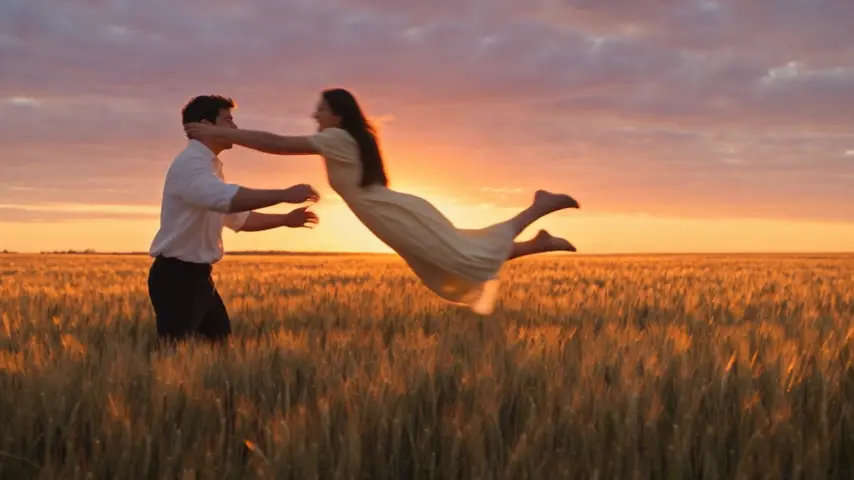
Around 9 seconds: the change of setting retains the direction of the approach. These are extracted frames from the video above.
For a short reunion clip, we find that compact sequence especially effective. It supports our recommendation for this specific style: recognizable tension, a decisive movement, and an affectionate ending within fifteen seconds. It does not mean every generated result will reproduce the sample's timing.
Other preset reunion stories
Seadanse: additional format and memory choices
Seadanse lists a 20-second story with sound, 9:16, 16:9, and 21:9 formats, plus human or pet roles. Its controls include memory choices and an optional note. The page lists $9.90 for a 720p video without account registration. Official product page.
Consider it if a wider frame, a pet, or a different memory setting is important. Its format and memory choices give you several ways to adapt the preset to your idea.
Watch Seadanse's official sample video, or view it on the product page linked above to explore its encounter and memory sequence.
ZombieTrend: preview the scene before making the video
ZombieTrend advertises a free, watermarked scene preview, followed by paid video generation. It lists vertical clips of 8, 12, or 15 seconds with sound. Its $5.90 pack covers one 8-second video; the $10.90 pack covers one video up to 15 seconds. Official workflow and prices.
This is worth considering if you want to evaluate the initial composition before buying motion. The still preview and completed video serve two stages of that process: choosing the scene, then seeing it move.
Watch the official couple example. The site's example section labels its showcased clips as unedited, eight-second results made with AI-generated people. That description comes from the provider; it is not an independently verified test history.
More control, or a different kind of zombie video
Kadenly: edit the scene direction
Kadenly exposes an editable story prompt alongside two portrait references and camera-direction options. Its product page includes the two example portraits and a dated generated result, described as 15 seconds at a vertical 480p setting with audio. Generation uses credits, with a quote shown before submission. Official tool and example.
That makes it a useful candidate when you want to revise the setting or ending yourself. Keep the two reference roles clear as you adjust the scene direction, then review the available settings before generating.
Watch Kadenly's official example video. Compare it with the reference portraits on its source page. This gives you more context than an isolated result, although it remains a provider-selected sample. Check the current quote and audio settings for your own selection rather than treating the example's specifications as universal defaults.
Kapwing: generate a character, then edit the project
Kapwing's zombie page describes creating content from text or reference images, then editing it in its studio. Its workflow includes reusable characters, follow-up prompts, and tools for arranging and finishing content. Official zombie generator.
Consider this route when your goal is a custom scene, a recurring character, or a video that needs captions and further editing. Its studio workflow suits a project you want to shape through several creative steps.
Check the current pricing and AI allowances against the features and export options you plan to use. Its public character tutorial provides an introduction to that workflow.
Glima: a single-person zombie transformation
Glima's Zombie Mode page describes uploading one image and choosing a transformation style to create an animated undead character. It includes a public demonstration. Official Zombie Mode page.
This is a close match if your request is “turn my selfie into a zombie.” Its focus is the appearance and animation of one character.
Watch Glima's official demonstration. It is a provider demonstration, not a fresh test for this article. We did not establish a task-specific checkout price or a complete export specification from the page reviewed, so those remain questions to resolve before paying.
How to judge the example videos
Watch each sample for the kind of story you would enjoy making. The examples in this guide use different people, settings, and lengths, including our own. They illustrate possible results rather than guaranteeing how your photos will appear.
For each example, review these points in order:
- Input context. Can you see the portraits used to create the result? Without them, you can judge the scene's appearance but not how closely it resembles the input.
- Role continuity. Follow each person from the encounter to the memory. Check whether the same person stays human and whether the transformed person's identity remains understandable.
- Movement and contact. Watch the approach and embrace at normal speed. Hands, overlapping faces, and moving bodies deserve more attention than a poster frame.
- Story transition. Does the memory feel connected to the encounter? Attractive scenery alone does not explain who the characters are or what changed.
- Sound and export. Turn on audio. Then check the stated length, aspect ratio, and resolution for that particular sample.
Use the linked source pages alongside the clips. For Seadanse, Kadenly, ZombieTrend, and Glima, the video links above point to media found on their official pages. They have not been reuploaded here. Provider media can change or become unavailable, so the product-page links offer the surrounding context and a fallback.
Our visual observations use sampled frames, including closer inspection of the lunge and weapon-lowering sequence in AI Zombie. Watch the linked videos at normal speed with sound to decide which mood and pacing you prefer. If you try several tools yourself, use the same authorized portraits and similar settings so the results are easier to compare.
Compare the payment needed for your actual video
| Product | Public cost information relevant to this comparison | What still matters |
|---|---|---|
| AI Zombie | $9.90 for one 15-second video | Additional versions consume credits; bigger packs require a larger payment |
| Seadanse | $9.90 for the listed 20-second 720p option | Check the quote for your selected settings |
| ZombieTrend | $5.90 for an 8-second option; $10.90 pack covers up to 15 seconds | The free scene preview is separate from the paid video |
| Kadenly | Credits; review the quote before submission | Selected settings determine what you are buying |
| Kapwing | Plans and AI allowances | Check feature access, export conditions, and billing period |
| Glima | No task-specific price established in this review | Confirm cost and output before committing |
The prices above are listed offers, not completed checkout tests. They were checked on October 10, 2026; use the linked official pages and checkout for current terms.
Compare the cash you must spend to get the clip you want. A cheap eight-second option is not automatically the cheapest way to obtain fifteen seconds. Likewise, a low per-video bundle rate is useful only if you need the extra videos.
Budget for creative retries separately from technical failures. A tool may return credits when a job fails while still charging for a successfully generated clip whose expression or motion you dislike. Read those conditions before you assume another version will be free.
Questions that change the choice
Which AI zombie video generator is the most realistic?
This research does not establish a winner. Public examples use different inputs and settings, and visual appeal is not the same as faithful identity. Use them to shortlist tools, then compare your own results under similar conditions if likeness is essential.
Is the app name enough to identify the tool used in a viral video?
No. Several tools offer a similar story structure. Look for the creator's original description or a documented workflow. A resemblance to a product example does not prove that product made the clip you saw.
Can I make a complete zombie apocalypse movie with these tools?
The reunion presets serve a short, specific story. A larger movie requires decisions about scenes, characters, continuity, and editing. An editable workflow is a more appropriate starting point, but you should expect to direct and assemble the project rather than rely on a single preset generation.
Choose the amount of direction you want
Choose AI Zombie if you want your two portraits to become a complete reunion story with minimal setup. The combination of named roles, no prompt writing, included sound, one-time packs, and a place to retrieve the finished video makes it a strong fit for a first attempt at this format.
For other creative plans, the tools above offer editable scenes, pet stories, studio workflows, and single-person effects. Choose the approach that fits the video you want to make.
If a 15-second story with two adult portraits fits your plan, create your AI Zombie video. Watch the example, check the roles, and review the price before you generate.