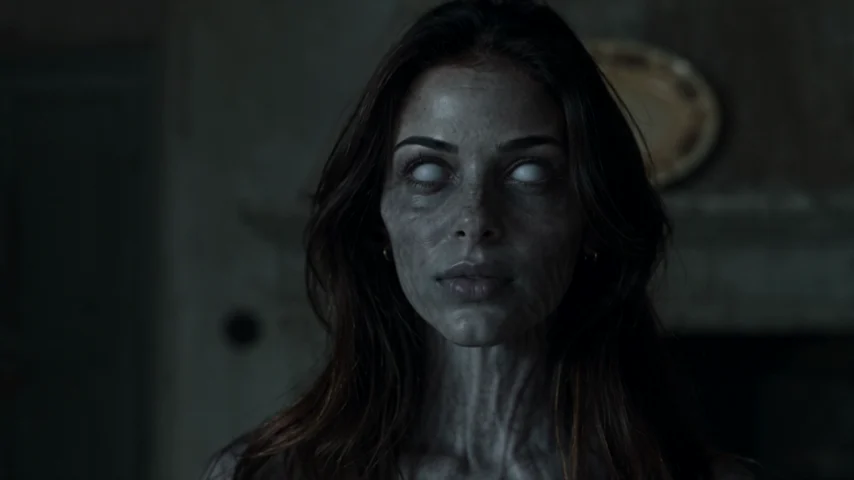
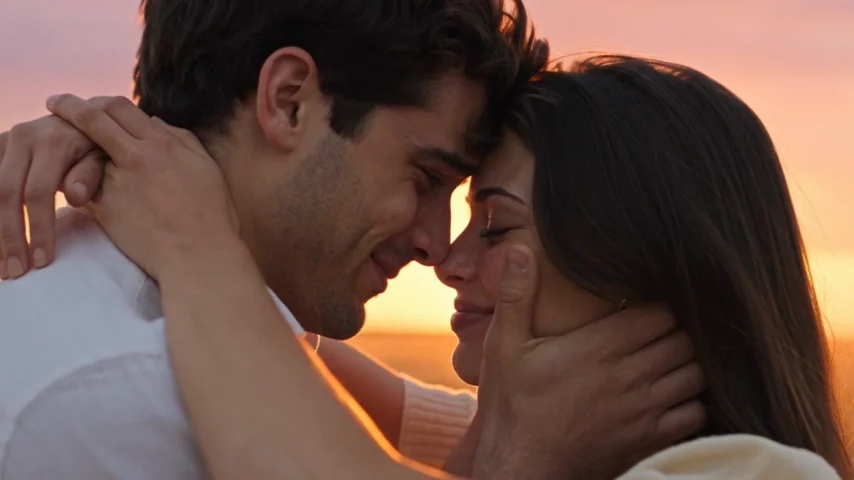
Not Another Matching-Costume Reveal
A fictional reunion solves a different problem. You can make a Halloween couple video with two existing portraits, even if they were taken in separate places. The AI creates new scenes rather than combining old videos. The dark opening gives the Halloween mood; the memory gives viewers a reason to care about the people in it.
Six Halloween Couple Video Ideas Built Around One AI Film
The ideas here are different ways to frame, share, or edit the resulting movie—not six buttons or presets inside the generator.
1. “I'd still choose you”
Let the entire 15-second story play with minimal text. Begin with “Even if the world changed overnight…” and finish the post with “…I'd still know it was you.” It's a romantic Halloween couple video without a lengthy voiceover.
2. The long-distance Halloween date
Use one authorized portrait from each partner, wherever you happen to be. You don't need a shared photo, and you don't have to meet to film. Text such as “Different cities. Same person I'd find in any universe” connects the fictional reunion with the real situation. Send the result privately first if you'd rather make it a small surprise between the two of you.
3. The role-reversal challenge
Make one version with you as the zombie and your partner as the human, then make a second version with the roles reversed. Ask friends, “Who would find the other first?” or compare which interpretation you both like more. This requires two separate paid generations; there isn't a free role-swap effect applied to a finished clip.
4. The party-night opening
Film a quick real-world clip of your matching costumes or use a genuine photo from your Halloween night. Add that material before the generated story in another editor, with a line like “Our costume story got a little out of hand.” The party scene is your own footage; the AI doesn't automatically recreate your house, decorations, or outfits.
5. The funny couple caption
Sometimes a contrast between dramatic footage and a familiar joke is enough. Try “He said he'd be ready in five minutes. Three apocalypses later…” or “Relationship status: complicated, even after the end of the world.” Keep the joke in the text overlay; you don't need a new video style to make the same short film feel playful.
6. The real-memory epilogue
Once the fictional memory ends, add a real photo from a trip, date, or ordinary Sunday. A simple card—“And this part actually happened”—distinguishes your shared history from the AI scene. This makes a particularly meaningful Halloween couple video for an anniversary close to October 31. The extra photo and title are additions you make after downloading.
How to Make a Halloween Couple Video From Your Photos
Choose your portraits. Use one clear picture of each adult, ideally with visible eyes, no heavy filters, and enough light to see facial features. Everyday clothes are fine. Accepted formats are JPG, PNG, and WebP, up to 8 MB for each image. Both adults must approve the use of their photos and their fictional portrayal.
Set the two roles. “The one who turns” becomes the zombie; “The one who stays” remains human. It isn't assigned according to who is taller, who is in the first picture on your phone, or the gender of either partner. Make sure you're happy with the casting before using credits.
Choose the screen shape. For TikTok, Instagram Reels, or YouTube Shorts, 9:16 is the natural starting point. Choose 16:9 if the Halloween couple video is for a landscape presentation or a private screen. Standard 480p uses 25 credits; 720p HD uses 50. Each option creates a 15-second MP4 with music and ambience.
Generate and watch it together. Sign in, confirm the required consent, and follow progress in My videos. Watch the finished film for facial consistency and the tone of the encounter. AI can change features, clothes, and movement, and exact likeness is not guaranteed. Download the MP4 within 30 days, then add an optional caption or personal photo in your usual editor.
Captions and Posting Ideas for Halloween Couples
For a romantic tone, try “I know that face in every universe” or “Till death do us part? Let's renegotiate.” For a playful version, try “We survived the group chat. We can survive this.” If your audience doesn't know the trend, begin with one line explaining the premise: “One of us changed. The other didn't leave.”
A Halloween couple video works best when the words complement the visuals rather than narrating them beat by beat. If your platform overlays buttons at the bottom, move captions into the central safe area. Listen to the generated soundtrack before adding music and use tracks you are permitted to publish.
Tell viewers the video is AI-generated. For realistic synthetic content, TikTok and YouTube provide disclosure options and may require them. The generated scene is fiction featuring your two authorized portraits; it shouldn't be presented as a real event or a recording of someone who never agreed to participate.
Want more of the specific two-photo trend? Read the AI zombie love story explanation. For generation-first instructions rather than couple-focused ideas, see the Halloween zombie video generator.
Halloween Couple Video FAQ
Can we make a Halloween couple video when we're in different cities?
Yes. Upload separate, authorized portraits of the two adults. You don't need a joint photograph or a live recording together. The AI generates a fictional scene using both people as visual references.
Do we need Halloween costumes or zombie makeup?
No. Clear everyday portraits generally make better references than faces hidden by masks or heavy makeup. The generator supplies the zombie story and its atmosphere, although exact character resemblance and clothing aren't guaranteed.
Can we choose a pumpkin patch, haunted house, or specific romantic ending?
No. This generator follows a prepared encounter, reunion, and imagined warm-memory sequence. It does not offer a location picker, prompt-based story rewriting, or a library of Halloween outfit transformations. You can decorate your finished post using an external editor.
Can we try both versions, with each partner becoming the zombie?
Yes. Put the photos in the opposite role slots and generate again. Each version costs credits separately: 25 for Standard 480p or 50 for 720p HD. Review the current balance and cost before confirming.
Is this Halloween couple video free to create?
You can explore the page and examples without buying a finished video, but generation requires credits. AI Zombie sells one-time credit packs rather than requiring a subscription. Check the current pricing for pack options.
Is the video suitable for sharing on TikTok or Instagram Reels?
Choose 9:16 for a vertical MP4, then preview the post to make sure the app interface doesn't cover the faces or captions. Follow each platform's current AI-content disclosure rules and make sure any added music is authorized.
Can we use a photo without asking the other person?
No. Both people must be adults aged 18 or older and agree to having their photos used to create the fictional video. A surprise gift can still be planned with someone's permission; consent comes before generation.