There isn't one officially named AI zombie trend song used in every video. A post may use an uploaded TikTok sound labeled Originalton (German for “original sound”), emotional piano, strings, or a different track entirely. To find the exact audio, open that post and tap its sound attribution.
Want to make the video first? Add two authorized adult portraits above. Our generator creates a fictional 15-second reunion with sound. Keep it or add permitted music later.
FROM OUR AI ZOMBIE EXAMPLE FILM
Let the music follow the change of heart.
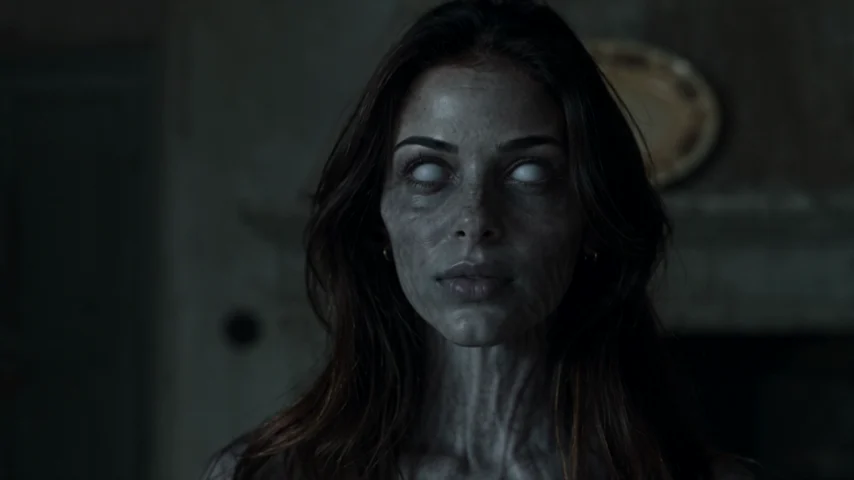 THE ENCOUNTER
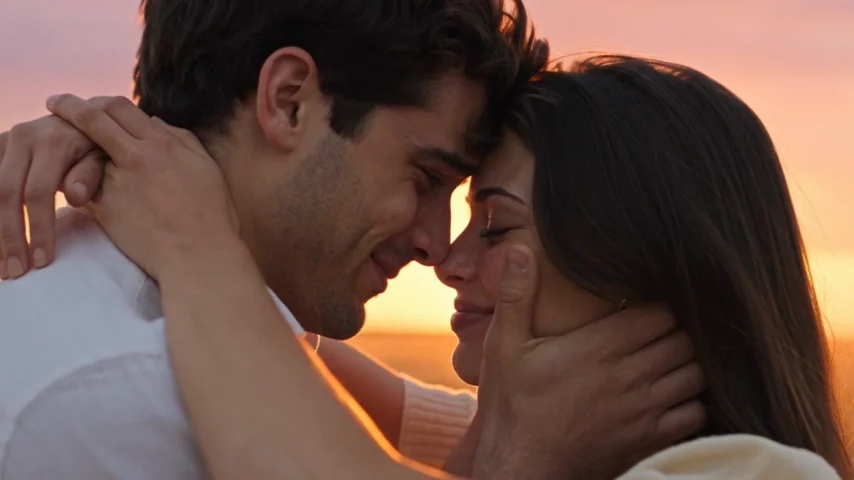 THE MEMORY
Two frames from the AI Zombie example film. They are not results from another service or evidence of a free generation. Faces, motion and timing can vary.
What Is the AI Zombie Trend Song?
The AI zombie trend song is the audio that accompanies a short, surprisingly tender apocalypse story. A survivor recognizes an infected loved one. Fear turns into an embrace, then a warmer memory. A quiet, tense score gives way to a musical swell.
Unlike a dance challenge built around one hit, this format is recognizable from its visuals. Similar zombie-hug clips can use different soundtracks; follow the post’s sound link rather than guessing from comments.
Is “Originalton” the Name of the Zombie Trend Song?
Not exactly. Originalton means “original sound” in German. A TikTok upload bearing that label is an original-sound attribution. It does not identify a unique commercial song or artist, and many unrelated TikTok uploads can display the same word.
The label can describe a mix of music, dialogue and effects. It does not grant reuse rights.
Follow the original post’s sound link, not a random result called “Originalton.” Save the creator handle or audio attribution for reference.
How to Find the Exact AI Zombie Trend Song on TikTok
- Open the video you actually liked. Reposts can use different audio.
- Tap the sound name or spinning-disc icon. TikTok normally opens the sound page associated with that post. It may name a song or an original sound.
- Listen to other posts using that sound. Check that it matches what you heard.
- Save the sound or choose “Use this sound” if available. Availability varies by account and region.
- Import your finished MP4. Keep the video and audio preview open so you can adjust where the selected sound begins.
If there is no sound link, check the creator’s comments or try music recognition on a clear segment.
What about Instagram Reels and YouTube Shorts?
On Instagram, tap the audio name shown on the Reel, then save or use the audio if Instagram makes that option available. On YouTube Shorts, look at the sound attribution and use audio available through Shorts creation tools. Music licensed in one app may not be cleared elsewhere.
If the sound is unavailable, choose an alternative that matches the scene rather than uploading an unlicensed copy of the track.
How to Add an AI Zombie Trend Song to Your Video
Our generator turns two authorized adult portraits into a fictional reunion, with music and ambience included.
Choose vertical 9:16 for TikTok or Reels, or landscape 16:9 if you prefer a wider frame. Generation costs 25 credits at 480p or 50 at 720p. View credit packs; there is no free render.
When the MP4 is ready, keep its soundtrack or upload it to TikTok or Instagram and add a permitted sound there. This generator has no song picker.
For photo preparation, see how to make an AI zombie video from two photos.
Sync the Music With the Embrace-to-Memory Cut
The secret isn't a specific song title; it's where the emotion arrives. In an illustrative edit, the characters move toward one another in the final third of the tense encounter, and the brighter reunion could begin around nine seconds. Your cut may differ; follow the actual footage.
Use this illustrative 15-second timing guide, then adjust it to your own footage:
| Approximate section | On-screen action | Audio direction |
|---|---|---|
| 0–4 seconds | Cold setting and recognition | Start quietly; keep ambience audible |
| 4–7 seconds | Hesitation and a change of heart | Build tension without drowning the scene |
| 7–9 seconds | Movement toward the hug | Leave a little space before the musical lift |
| 9–15 seconds | Warm memory and embrace | Let the fullest musical phrase begin near the cut |
In CapCut, place the song on an audio track, look for the moment the visual scene changes, and move the music so its strongest phrase lands there. Adjust the trim and volume. Avoid a long crossfade that weakens the cut.
Balance existing wind or music against the added track. Two loud scores sound cluttered. Read our love story Reels editing guide for framing and finishing tips.
Which Music Style Works Best? Use Cases
For a couple: A restrained piano theme or slow strings can make the memory scene feel personal. Personal meaning can matter more than popularity.
For adult family members: Try warm instrumental music without romantic lyrics. Leave space for the recognition.
For close friends: A nostalgic instrumental or a softer version of a shared favorite can make the change from fear to relief feel less melodramatic.
For a Halloween post: Start with unsettling ambience and move toward a gentler musical ending. The contrast makes the reunion clear.
Use only authorized portraits of consenting adults.
Before Posting: Audio Rights and Common Mistakes
Music listed in a social platform's library may be available for particular kinds of posts but not for commercial advertising or reuse on other platforms. Business accounts can have different choices from personal accounts. For a brand post, choose music licensed for that use; TikTok offers a Commercial Music Library for eligible usage. YouTube also explains the distinction between Shorts library audio and imported copyrighted tracks.
Before publishing, check the cut timing, overlapping scores, and whether interface elements cover faces. Preview the uploaded draft.
Label fictional AI-generated content where required.
Official sources and further reading
These platform guides explain music selection and reuse limits. The timing table is an illustrative editing guide, and the sample frames come from AI Zombie.
Frequently Asked Questions About the AI Zombie Trend Song
What song is playing in the AI zombie trend?
There is no single officially identified song used by every creator. A post may use a sound labeled Originalton or an emotional instrumental track. Open the exact social post and tap its audio attribution to identify that version.
Is “Originalton” a real song title?
No. It is the German label for “original sound,” not a unique title or proof of a specific artist. Follow the sound from the post itself instead of searching only that word.
Can I use the same AI zombie trend song on Instagram?
Only if it is available for your account and permitted use. Check the Reel's audio attribution or Instagram's music tools. Having access to a TikTok sound does not automatically give you the rights to upload that audio separately on Instagram.
Does AI Zombie include music in its videos?
Yes. The 15-second output includes generated music and ambient sound. You can post with the included audio or add another permitted track when editing elsewhere. Our generator does not offer a song picker.
Where should the beat drop in a 15-second zombie video?
Aim for the actual embrace-to-memory transition. The timing guide above suggests nine seconds, but the actual cut can vary. Preview your video frame by frame and line up the strongest musical phrase with the change in mood.
Can I download the original zombie trend audio here?
No. This page explains how to find sounds through their original platform attribution. It does not host the TikTok upload or provide an MP3 download.
Why was my zombie video muted after posting?
A platform may restrict audio because of rights, account type, or regional availability. Check its notice and replace the sound with an allowed option. Downloading an audio file from another creator does not remove licensing restrictions.