Browsing examples and signing up at AI Zombie are free, but generating a video on this website is not free. A 15-second fictional zombie reunion requires paid credits. Our $9.90 Starter pack covers 2 480p videos or 1 720p video. To spend nothing, try limited free credits elsewhere or edit footage you own.
Ready to create a complete story? Use the generator above to upload portraits of two consenting adults, choose their roles, and review the credit charge before confirming. Choosing photos does not start a charge.
FROM OUR AI ZOMBIE EXAMPLE FILM
The prepared story you can make here.
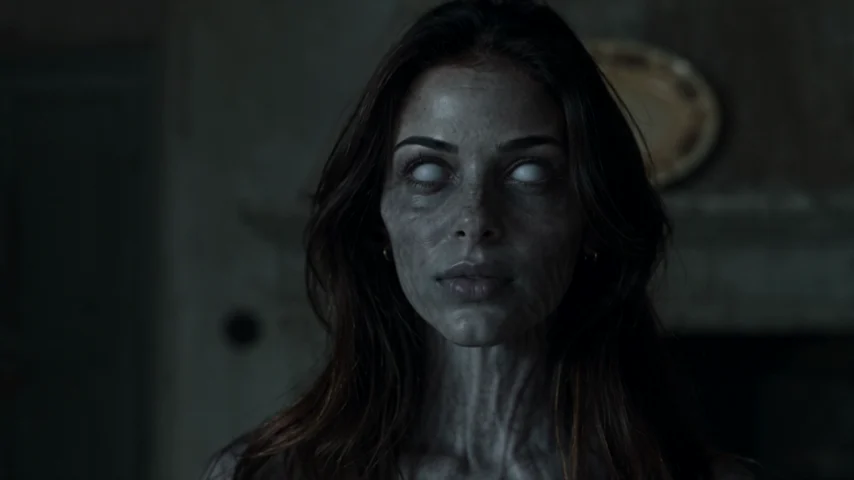 THE ENCOUNTER
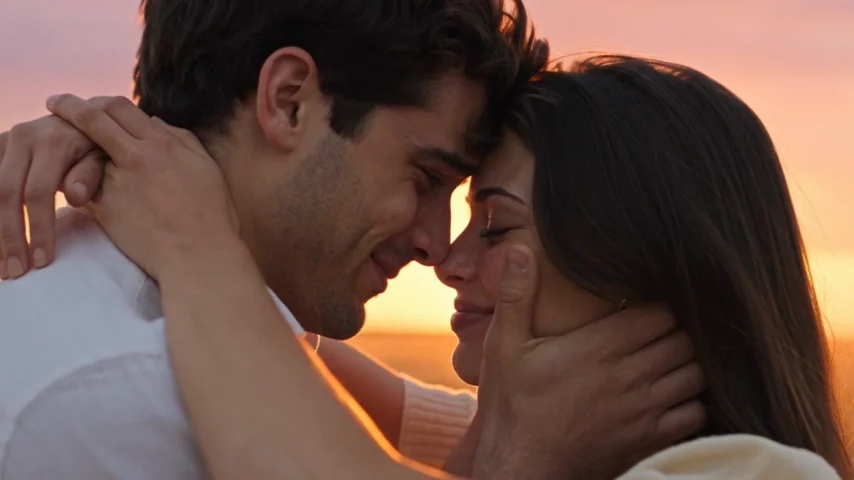 THE MEMORY
Two frames from the AI Zombie example film. They are not results from another service or evidence of a free generation. Faces, motion and timing can vary.
Is AI Zombie Video Free on This Website?
No. You can view the example film, explore the guides, and create an account without purchasing a pack. You can also prepare your two portraits before deciding whether to pay. Generating requires credits and confirmation.
The generator turns authorized adult portraits into a fictional encounter, embrace and warm memory, with new motion and sound. It is not a free face filter and does not accept children or pets.
If AI zombie video free means “a complete moving story at no cost,” the answer here is no.
How Much Does an AI Zombie Video Cost?
Videos run 15 seconds with sound, in 9:16 or 16:9. They cost 25 credits at 480p or 50 credits at 720p, sold in one-time packs.
| Credit pack | One-time price | 480p videos | 720p videos |
|---|---|---|---|
| Starter: 50 credits | $9.90 | 2 | 1 |
| Popular: 150 credits | $24.90 | 6 | 3 |
| Creator: 250 credits | $39.90 | 10 | 5 |
That works out to $4.95 per 480p video with Starter or $9.90 for one 720p video. Larger packs reduce unit cost if you need multiple videos. Credits never expire, with no renewal. Taxes appear at checkout.
Confirmed failed renders return reserved credits; completed results are not automatically free to remake. See the refund policy.
Where Can You Try AI Zombie Video Free Instead?
If you are comparing AI zombie video free options, look closely at what “free” buys you. Some animate short scenes; others only edit footage. Neither guarantees a full two-person story.
Dreamina: experiment with daily creative credits
Dreamina documents a free daily-credit allowance for supported image and video workflows. You can try creating a short zombie encounter, then a separate warm-memory shot with its image-to-video tools. Availability, supported models, video length and credit charges vary. Daily credits do not guarantee a 15-second film. Check the charge before each attempt.
Best for learning prompts and assembling scenes. Follow our AI zombie trend in Dreamina tutorial for a two-scene approach.
Runway: a small, one-time free evaluation
Runway's Free plan lists 125 one-time credits and access to selected models. Credits do not renew; free exports have a watermark, and available models can change. Best for a short test shot.
PixVerse: free daily credits for short experiments
The PixVerse pricing page lists 30 daily credits on its free Basic plan and an output limit of 540p. Check the account balance and model costs before starting. Model, length, audio and resolution affect the charge. Verify your settings before attempting a free export.
CapCut: edit for free, but bring the footage
CapCut's editing templates can help you time an existing encounter clip against a memory clip, add captions and adjust music. Some assets need Pro, and templates do not automatically animate two portraits into a story. Our CapCut zombie-template guide explains the difference.
Free creative credits and free editing come with limits. Check current terms; we have not rendered the full story on every service.
How to Make a Zombie Video for Free: A Practical DIY Route
For an AI zombie video free experiment—not a guaranteed full recreation—try these steps:
Get permission and choose two adult portraits. Use clear, well-lit faces you are authorized to use. Plan which person stays human and which becomes a fictional zombie.
Write two short scene descriptions. Scene A: a tense recognition in an abandoned room, ending with an open-armed approach. Scene B: the same two adults embracing in warm afternoon light. Avoid graphic wounds.
Use available free credits for one brief test clip. Dreamina, Runway or PixVerse may offer a supported mode. Check the model, length, watermark and available balance before pressing Generate.
Scene A prompt: “Two recognizable adults face each other in an abandoned room. One appears gently zombified; the other recognizes them and opens their arms. Slow camera, no graphic violence.”
Scene B prompt: “The same adults continue the reaching gesture in a sunlit field, both healthy and relieved. Warm light, consistent facial details, gentle embrace, no extra people.”
Try a separate memory clip only if the budget allows. Reuse the same reference faces, clothing cues and movement direction. Identity and match-cut accuracy are not guaranteed.
Assemble the material in an editor. Place the two clips in order, trim at the movement, and use permitted music. With only stills, make a slideshow rather than claiming an animated embrace.
Preview before sharing. Check faces, hands, transitions, music rights and any AI-content labeling requested by the platform.
A free allowance may be enough for a short test but not two usable shots. If credits run out, compare prices before buying.
When Paying for a Prepared Story Makes Sense
Our paid generator is a different trade-off. You choose two adult portraits, assign “The one who turns” and “The one who stays,” then select 9:16 or 16:9 and confirm a credit charge. The story structure, movement and sound are prepared for you; you do not have to write two prompts or stitch clips into a film.
It saves manual shot planning, but does not offer screenplay edits, song selection, guaranteed likeness, or unlimited revisions. Download your MP4 within 30 days.
To avoid paying, experiment with free tools. For a prepared film, review credit packs.
Use Cases: Choose by What You Actually Need
Try the trend before spending: Watch existing examples and test one short shot with any available free credits. Judge the mood before attempting a full story.
Make a couple's reunion video: Two authorized adult portraits work with our prepared story. Pick the roles deliberately; switching photos changes which person becomes the zombie.
Create a video with an adult friend or relative: Get both adults’ permission and label the film as fictional.
Learn AI video editing: A manual workflow provides control, within credit limits.
Official sources and further reading
External free allowances, models and export restrictions can change. These official pages describe their current offers; we have not generated a complete zombie story on every service.
Frequently Asked Questions About Free AI Zombie Videos
Is AI Zombie Video Free without signing up?
You can watch examples and read guides without paying, but this site does not offer free video generation, with or without an account. Generating requires sign-in and paid credits.
Does AI Zombie offer free trial credits?
No. There is no free generation trial on this website. Its one-time Starter pack costs $9.90 and includes 50 credits.
Can I make an AI zombie video free with Dreamina?
You may be able to create short clips using Dreamina's available daily credits. This is a manual workflow, and the number of usable clips depends on model and settings. A complete 15-second two-person story is not guaranteed within a free allowance.
Is CapCut's free zombie template the same as an AI story generator?
Usually not. Templates typically arrange supplied photos or video with preset timing or effects. Check the preview and media requirements; an editable template alone does not ensure new animated scenes or a memory transition.
Does a free video generator add a watermark?
Policies differ. Runway says its Free-plan video exports carry a watermark. Other tools may restrict resolution, models or downloads. Check each provider's current export terms.
How many AI Zombie videos do I get for $9.90?
At our current prices, 50 credits pay for two 15-second 480p videos or one 15-second 720p video. Credits are deducted only when you confirm each generation.
If my AI Zombie video fails, do I pay again?
A confirmed technical generation failure returns its reserved credits automatically. A completed but creatively unsatisfactory result is different; consult the refund policy before ordering another version.
Can I use a pet photo or a child's picture here?
No. Our generator supports authorized portraits of two consenting adults only. It does not offer a pet mode or accept children's portraits.